
Qritico features
Qritico is an app for rating video games, writing reviews, organizing your game library and discovering what to play. It has a free plan and the optional Pro and Pro+ plans. This page lists all 246 features, grouped by topic.
Features with a plan label (Pro, Pro+ and others) need that plan; the rest are free. Some free features have a monthly limit, shown on each one.
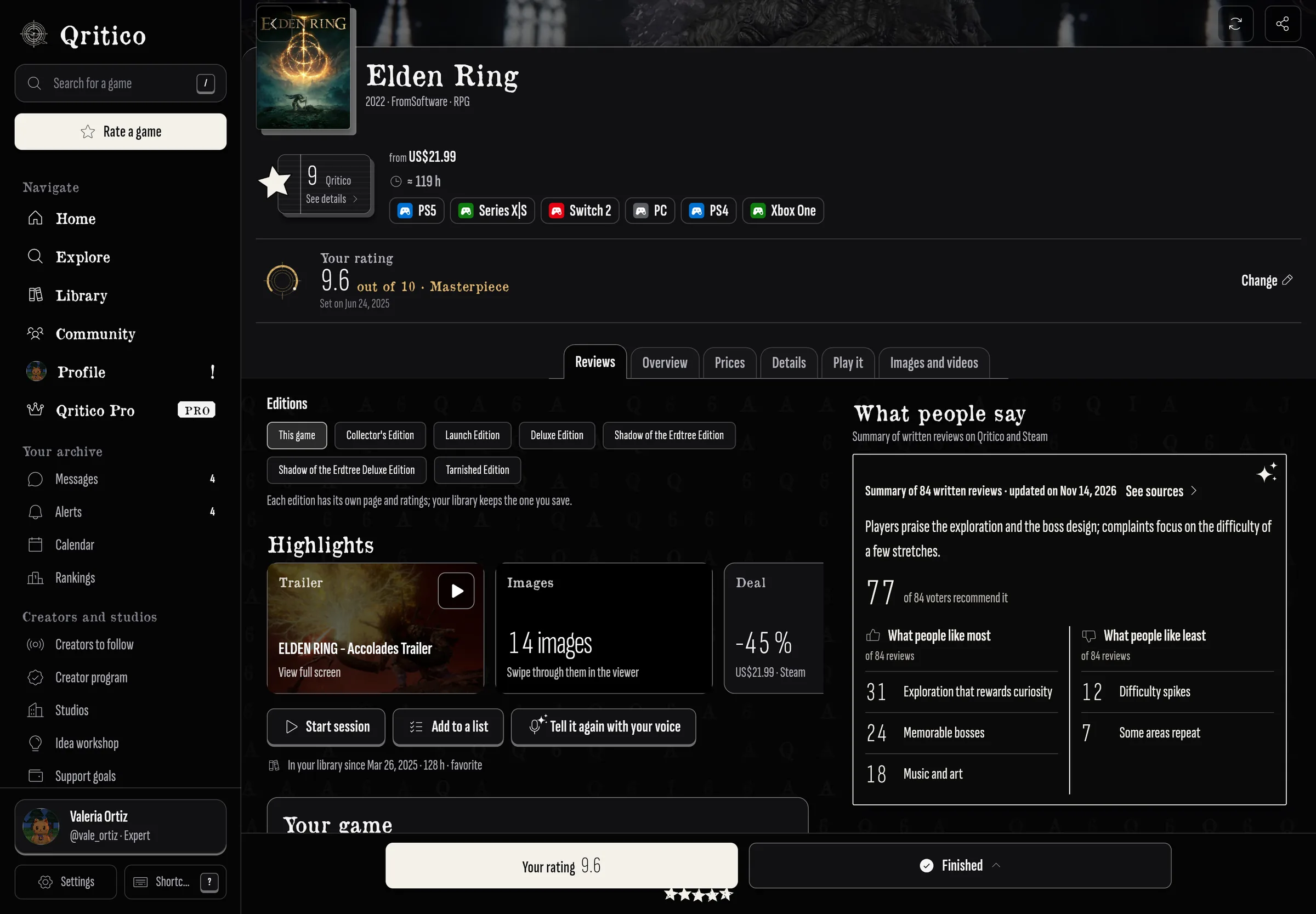
Features by group
Rate and review
Features for rating games, writing reviews and reading opinions.
31 features
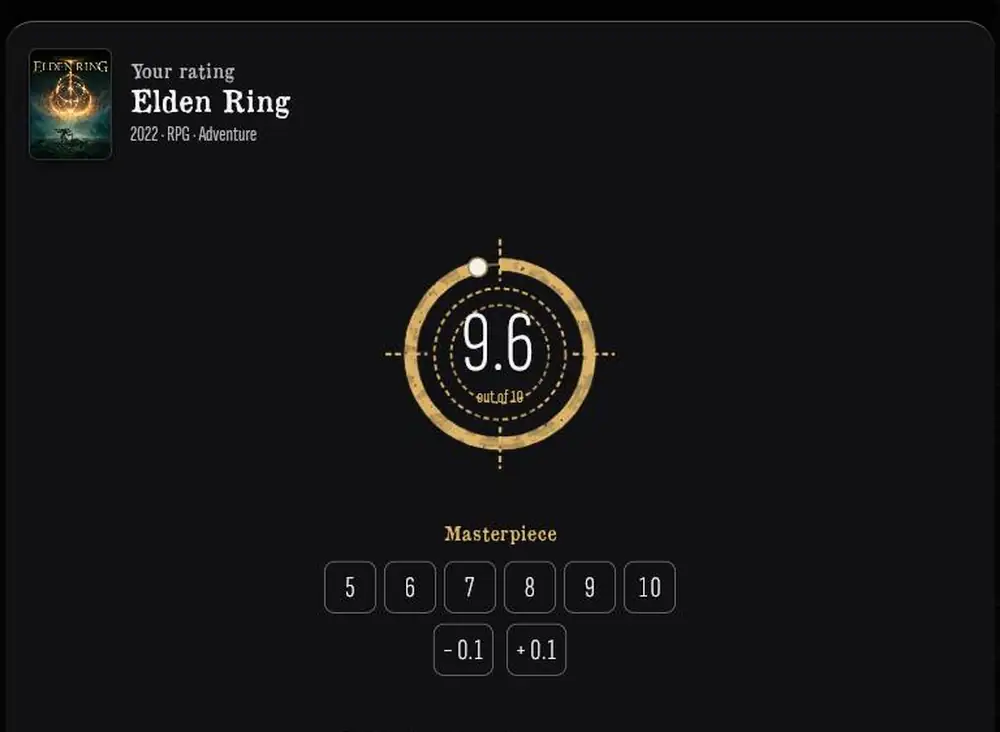
- Rate from 1 to 10
- Scores allow decimals and each value has its word, from Very bad to Masterpiece.
- Write reviews
- Each review carries a rating, a recommendation, text, a spoiler notice and tags; with Pro the text can reach 10,000 characters.
- Dictate reviews
- Qritico organizes what was dictated (3 a month free, 30 with Pro and 300 with Pro+).
- Limits: Free 3 · Pro 30 · Pro+ 300
- Rate several games in a row
- Each card shows a familiar game to rate from 1 to 10, send to the wishlist or skip.
- Add context notes
- They are published when approved by people who gave the game high and low scores.
- No spoilers
- Hide or remove spoilers, videos, images, and words from games you haven’t finished.
- React to a review
- Besides Helpful there are four reactions: Agree, Made me laugh, Good point and Respectfully disagree.
- See score history
- Each rating change is kept with its date, the previous rating and the difference; one tap opens the game.
- Build podiums
- A podium ranks up to ten games by hand.
- Limits: Free 20 · Pro 100 · Pro+ 100
- Read the review summary Pro
- The summary states what people like most and least, and in how many reviews it appears.
- Talk through a review
- A spoken conversation about the game becomes a draft.
- Limits: Free 10 · Pro 120 · Pro+ 900
- Predict a game’s score Pro+
- It is calculated from at least 8 of a person’s own scores.
- See how useful reviews are
- Includes records and correct calls.
- See reputation
- Shows the points and level, the bar toward the next level, its benefits and the points history.
- Mark "It helped me" in a review
- Optional and counted without a name.
- Support a game for mental health
- Appears on each game page.
- Verify game ownership
- Steam confirms it and the review carries a badge.
- Vote for useful reviews
- The vote counts more when it comes from someone with a good reputation.
- Post video reviews
- Videos up to 60 seconds are accepted, plus links from YouTube, TikTok, Instagram, Facebook and Twitch, which play in their official player.
- Share a postcard after finishing a game
- When a game is finished, a stamped ticket is made with the date, hours and rating, shareable as an image.
- Get a review reminder
- (one a day at most; at night it arrives silently)
- Filter reviews by language
- They also sort by usefulness or date, and can be translated.
- Pin reviews and lists Pro
- Up to 3 of each stay at the top of the profile.
- Feature a review Pro+
- The review appears in Community highlights for 7 days (one free per month with Pro+).
- Turn a review into a poster
- The poster takes 5 colors from the cover and has three templates.
- Rate from 10 to 100
- The scale changes in Settings, under Personalization.
- Post an audio review
- The audio lasts a few seconds.
- Rate performance
- The score is compared with people using the same hardware.
- Write longer reviews Pro
- The review length limit rises from 1,000 characters on the free plan to 10,000 with Pro.
- See review analytics Pro
- With Pro, profile visits and reads of reviews and lists over the last 30 days are shown, day by day.
- Read popular reviews
- Community highlights the three reviews with the most Helpful votes of the week and, if there are fewer, those of the month or of all time.
Play and organize
Features for opening games and keeping the library.
33 features
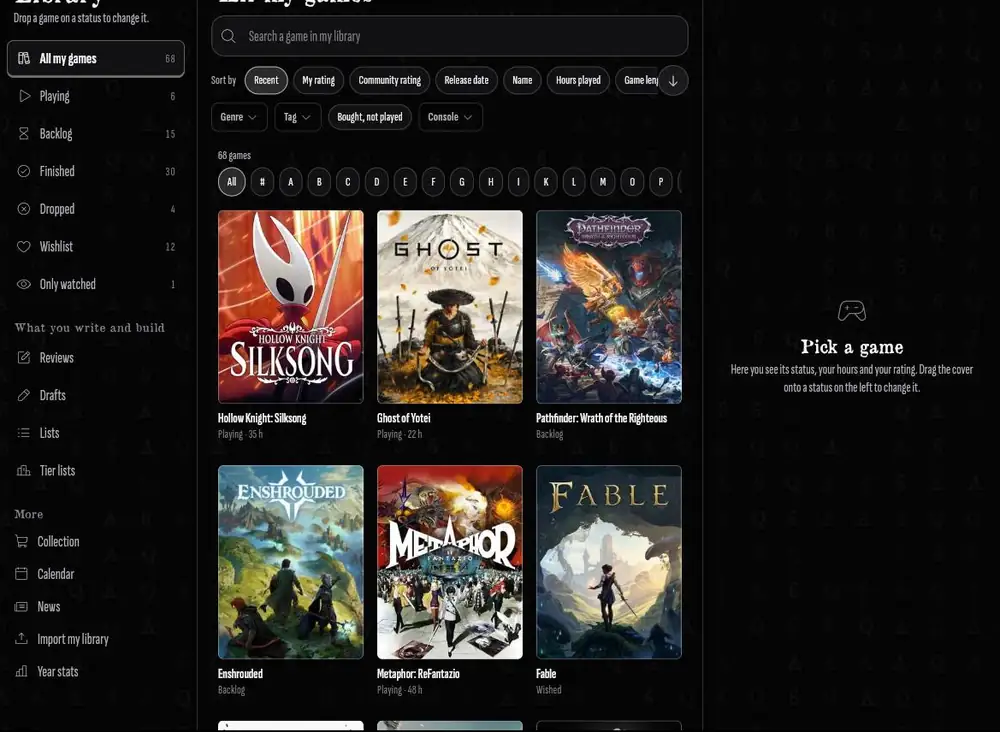
- Organize the library
- Games are split by status: Playing, To play and Completed, among others.
- Import a library
- Works with HowLongToBeat, Grouvee, Backloggd and Playnite.
- Build tier lists
- A tier list places games in rows from S to D.
- Limits: Free 10 · Pro 100 · Pro+ 100
- See pending games
- The Backlog list gathers the games saved for later, with search, sorting, filters and a list or grid view.
- Keep a wishlist
- Wishlist games are organized into named groups, and purchased games that are still unplayed can be filtered.
- Create game lists
- Lists can be sorted and shared, and other people’s lists can be copied.
- Limits: Free 10 · Pro 200 · Pro+ 200
- Decide what to play today
- With the free time and an optional mood, suggests games from Playing and Backlog, each with its reason.
- Track a collection
- Each game stores what it cost, the cost per hour and who borrowed it.
- Change the order and view
- The library sorts by score, length or date and displays as a grid or a list.
- Open games
- Games open on a phone, in the cloud, on a console or on a PC.
- Choose by mood and length
- Includes games from the library and recommendations.
- Ask for recommendations in writing
- Qritico suggests games from a description and explains why.
- Limits: Free Not included · Pro 100 · Pro+ 500
- Choose what to play
- Qritico picks one of the pending games at random.
- Decide what to play with friends
- Pick who is playing and a list of multiplayer games that everyone owns or wants appears, with the reason for each.
- Keep a game diary
- Each timed session becomes a line with its hours and rating, grouped by day.
- Register physical games
- The phone reads the title and code from a photo of the box.
- Follow a series in order
- The list shows the order of the games and the total hours.
- Hide games
- A hidden game stops appearing in recommendations.
- Note where a playthrough stopped
- At the end of a session, the note is saved as a save point and appears next to the Continue playthrough button.
- See the history of a game
- Gathers save point, hours, playthroughs, moments and rating changes for a game, with a log by day.
- Review a game’s history
- Each playthrough with its dates, sessions and rating, and what changed between them.
- Save moments from a game
- A moment is a screenshot with a caption.
- Limits: Free 20 · Pro 300 · Pro+ 2000
- Write private notes
- Each library game takes a note of up to 500 characters that only its author sees, even if the library is public.
- Change a cover
- Applies to a copy of a game or to a list.
- Add a game that isn’t listed
- With a link from itch.io, Game Jolt or Steam; the community confirms it.
- Add a game by hand
- For a game that is not in the catalog (only the person who adds it sees it).
- Resume unfinished games
- Home shows the games in Playing that have gone 30 days without being played.
- Use Qritico offline
- The library stays available and its changes upload when the connection returns.
- Check whether a game is already included
- The check covers Game Pass and Netflix.
- Get a refund reminder
- The Steam deadline is estimated from when the game reached the library.
- Mark games as purchased
- The library shows purchased games that have not been played.
- Save searches
- A search with its filters is saved with one tap, synced with the account and reopened from Explore.
- Connect Xbox
- A gamertag, the Xbox username, is enough.
Discover games
Features for finding what to play and following releases.
43 features
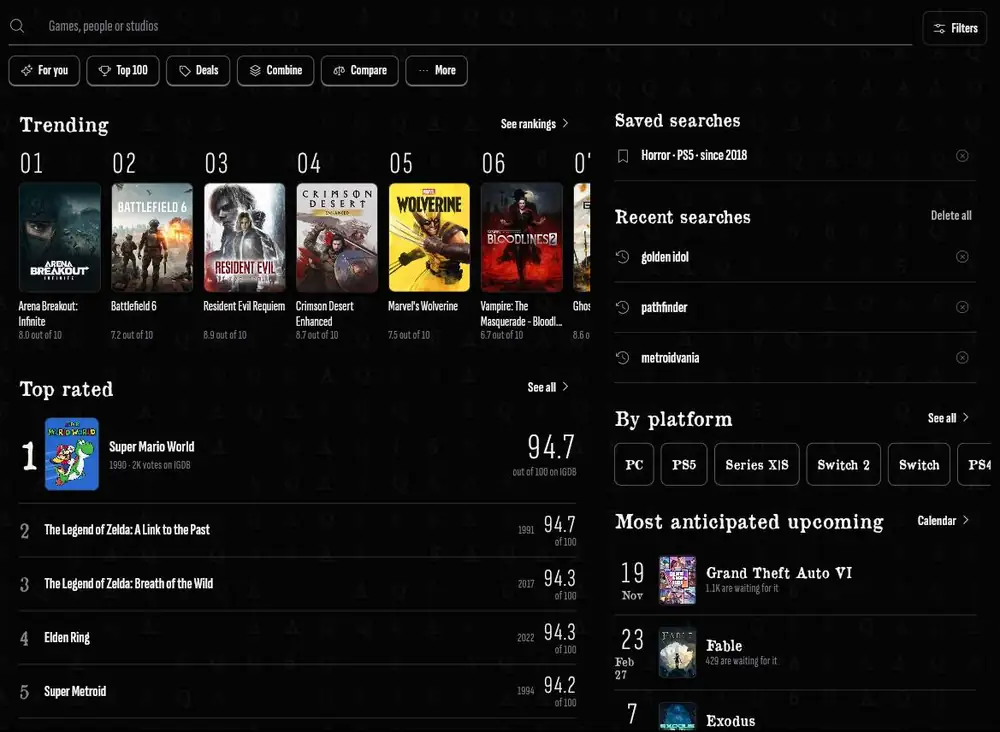
- Get recommendations
- Each recommended game states its reason.
- Decide between recommendations
- One by one.
- See where to play a game
- Appears on each game page.
- Search Qritico
- Includes people, studios and features.
- See the Top 100
- The hundred best games combine 70% community ratings and 30% critics, with genre, platform and year filters.
- Filter results
- The filter sheet narrows by genre, platform, game mode, theme, studio, year and minimum rating, and sorts the result.
- Check the calendar
- Includes releases, DLC, events and free games.
- Find little-known games
- A section of Explore gathers highly rated games with few votes, sorted by taste when personalization is on.
- See rankings
- Tabs of community rankings: tier list consensus, trending, most anticipated, most played, most wishlisted and reviewers.
- Compare games
- Puts two to four games side by side on rating, critics, price, difficulty and length, with export to CSV or PDF.
- See more recommendations Pro
- Pro adds extra sections, such as games from a highly rated studio, a favorite theme and people with similar tastes.
- Analyze tastes
- The summary is free and the full analysis requires Pro.
- Limits: Free Summary · Pro Full · Pro+ Full
- See mobile games
- Android, iPhone and the ones the community confirmed in Google Play Pass.
- See what leaves Game Pass and PlayStation Plus soon
- Each date comes with its source.
- Add releases to the phone calendar
- Games on the list are added with the release day of the region, in Google Calendar, iPhone or Outlook.
- Add a release to the calendar
- Adds one game on its release day in the region.
- Combine games
- The result is games similar to the chosen ones.
- Follow events
- Includes showcases and awards shows.
- Get a reminder before an event
- Each upcoming event has a switch that turns on a reminder shortly before it starts, if its time is known.
- Make event predictions
- Before the event, each person picks who they think will win.
- Follow esports
- Live matches with scores, upcoming matches and results by game, plus the option to follow leagues and teams.
- Listen to game soundtracks
- Four rows of albums (yours, recommended, popular and trending) lead to Spotify, Apple Music or YouTube Music.
- See a taste map
- Each person chooses whether to appear on the map.
- Read game news
- Three tabs gather news from the library and followed channels, upcoming dates and Qritico updates.
- Guess the game of the day
- Each day has a new image.
- Check the region
- Shows releases for the next 90 days in the chosen country and the most played games there in the last 14 days.
- View a saga in release and story order
- Opens from the Franchise row of the game page and from the saga progress. Each game says where to play it.
- View a game’s languages and dubbing
- Shown on the game page: Latin American dub, Spain dub, and Spanish subtitles and interface.
- View a game’s cast and voices
- Includes links to the Latin American and Spain dubbing casts.
- See who is streaming a game
- A game’s page lists up to five channels streaming it right now on Twitch and YouTube, with their viewers.
- See games that support mental health
- Recognized by mental health organizations or supported by the community.
- See online multiplayer games
- With their atmosphere and community.
- See gaming community initiatives
- Shows the official page, what each one asks for, how to join and its status.
- Filter games by way of playing
- No combat, sessions under 30 minutes, can be paused and no required connection. The community confirms each one on the game page.
- Playing with kids
- With the Preferences switch on, the game page adds the region’s age rating, local co-op and flagged content, and Search adds the filter for kids.
- Check compatibility and accessibility
- Appears on the game page before buying.
- See what followed channels are streaming
- Shows who is streaming now on Twitch and YouTube, with followed channels first and a player inside the app.
- See new releases
- Shows games released in the last four months, ordered by recency, interest and quality.
- Watch live streams
- Home shows who is streaming the trending games.
- See popular lists
- In Rankings, the Lists tab gathers the public game lists with the most community support.
- Watch short videos
- Reviews and clips appear one after another.
- Use Qritico in more languages
- Includes Portuguese, French, German, Italian, Japanese, Korean and Chinese.
- See events with their own design
- Major showcases have their own palette and a place on Home.
See progress
Features for following activity and achievements.
18 features
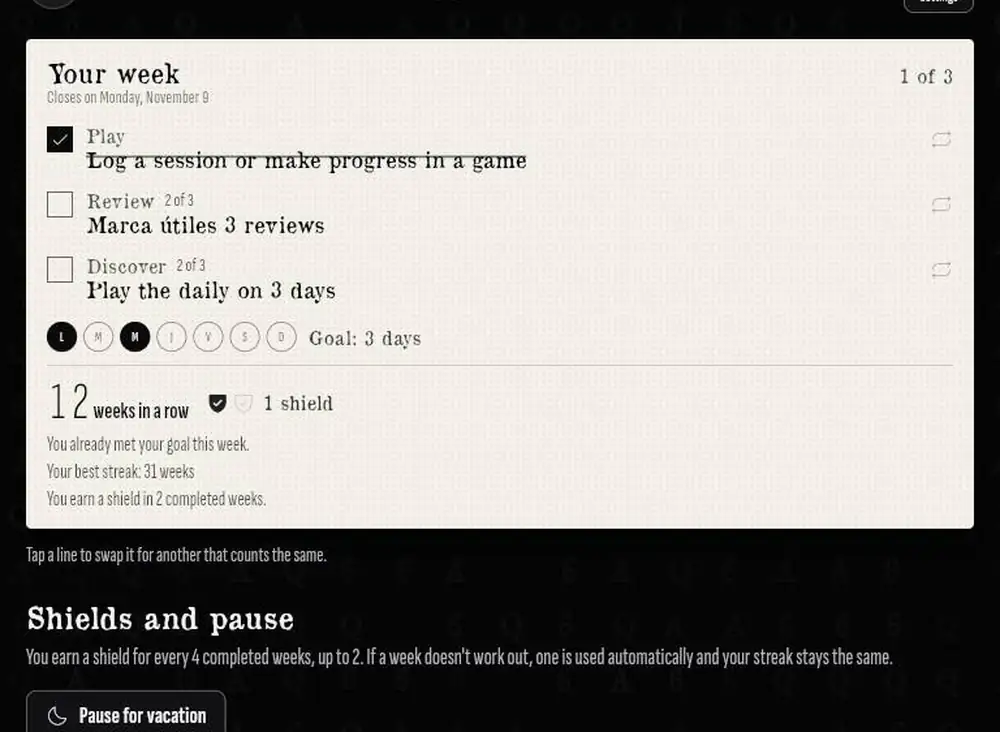
- Follow weekly activity
- Three rows and a goal fill up as you play, review and discover.
- Collect achievements
- Each achievement is a stamp with rarity and points; pending ones show their progress and there are filters by status and rarity.
- See the year in review
- Swipeable cards with games rated and finished, hours, best and worst rating, genre of the year and most active month.
- See the month in review
- Swipeable cards with the month’s rated and finished games, the hours logged and the best and worst rating.
- See the month in review as a newspaper
- The month’s newspaper front page gathers rated and finished games, best rating and average, and is shared as an image.
- Level up
- A screen shows what improved.
- Complete monthly challenges
- Each completed challenge gives a stamp.
- Get the weekly selection
- It comes out every Thursday. It may bring a recommendation, a deal and a free game.
- See congratulations
- Groups the congratulations received for finishing a game, publishing a review or building a tier list, with who gave them.
- See retired achievements
- They can no longer be earned and keep their date.
- Use titles and cards
- Titles appear under the name and visiting cards on the profile card; both are earned through activity and equipped.
- Review the games finished each year
- Includes a chart by month, the scores and the platinums.
- See the recap by week, month, six months or year
- It plays like stories, with each screen ready to save or share as an image.
- Remember what was played at each stage of life
- A private list of the games from each stage by year, with the age back then; added by hand and used to guide recommendations.
- Write time capsules
- A message about a game opens in 6 months or a year.
- Compare what was watched and played
- Viewed means game pages opened. The comparison is by genre or by franchise.
- See details of saved games
- These are visual details that recognize a saved game. They turn off in Personalization.
- Get the week by widget and email
- The Android widget shows the three lines of the week, and a summary arrives by email every Monday.
Customize the profile
Features for changing the profile and its 3D scene.
29 features
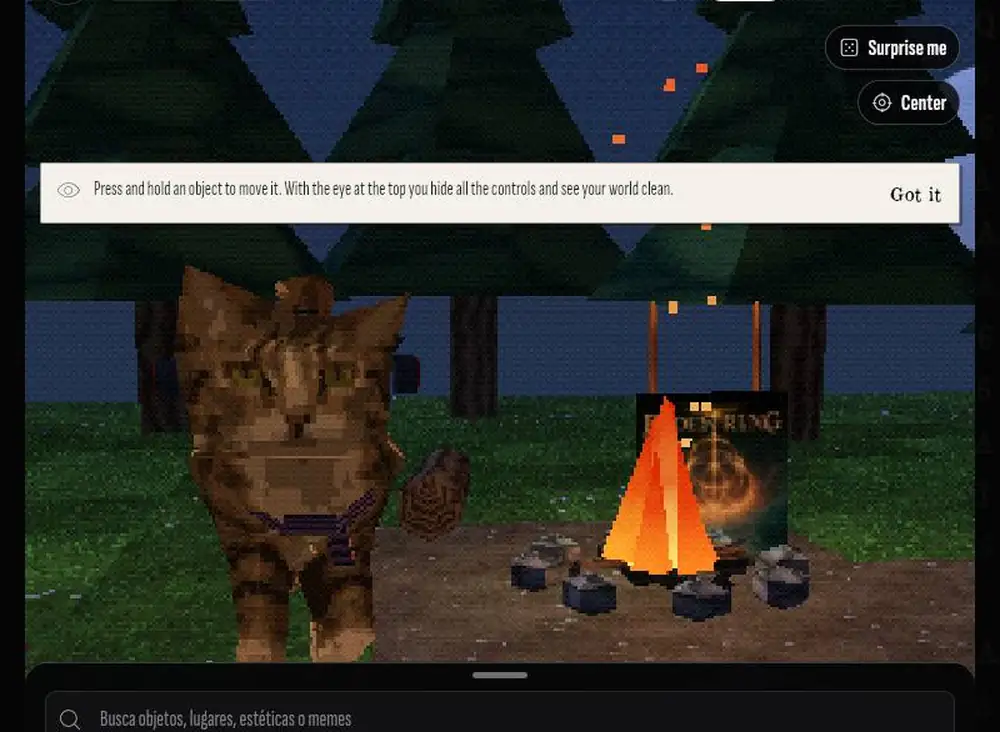
- Create a 3D scene
- A chosen character, place and objects form the profile scene.
- Customize the ID card
- The card on the profile.
- Choose a character
- There are 12 characters in nine styles.
- Choose a setting
- There are 23 places.
- Arrange the profile
- Blocks change order.
- Change the color palette
- There are three free. Pro adds five more.
- Limits: Free 3 · Pro 8 · Pro+ 8
- Decorate the wall
- Accepts photos, GIFs, notes and stickers.
- Design an emblem
- Built from shapes, symbols and up to two images.
- Set the 3D scene as cover
- Visitors see the live scene when they open the profile.
- Display games in a room
- Favorite games sit in display cases that visitors can walk through.
- Visit another person’s scene
- The Visit their world button, on profiles, reviews and posts, opens the 3D scene of whoever built one, with reactions.
- Compare tastes with another person
- Two profile cards face off in rounds of numbers, with the games they share or not and what each should play.
- Leave messages on a profile
- Each profile has a guestbook.
- Adjust appearance and accessibility
- Four text and button sizes, a high-contrast palette, light or dark theme and three levels of motion.
- Customize the review stamp Pro+
- The chosen text appears on the stamp.
- Change the app icon Pro+
- Three alternative icons for the home screen, Ink, Paper and Stamp, on Android only and with Pro+.
- Change the username
- (free once a year; every 30 days with Pro)
- Limits: Free Once a year · Pro Every 30 days · Pro+ Every 30 days
- Show ambassador stamps
- The profile shows the stamps earned by helping studios and the credits received in their games, if there are any.
- Choose more settings
- Includes a Mexican street, an arcade and a space station.
- Choose dark fantasy castles
- Each castle has its own lighting.
- Change the setting’s colors
- The time of day and the weather also change.
- Choose new characters
- There are six more, including a moth and an axolotl.
- See the character on Home
- Tapping it opens the 3D scene.
- Show the character in the bar
- The Profile icon uses the character’s face.
- See character reactions
- The character celebrates finished games and complete weeks.
- See the character on empty screens
- The built character’s little face peeks out from the corner of empty sheets that invite filling something in.
- Visit a scene from a post
- Tapping the author opens their 3D scene.
- See the profile preview
- Shows the profile as any person with an account sees it, without the hidden blocks or the owner controls.
- Turn off the character
- (outside the profile)
Join the community
Features for interacting and competing with other people.
25 features
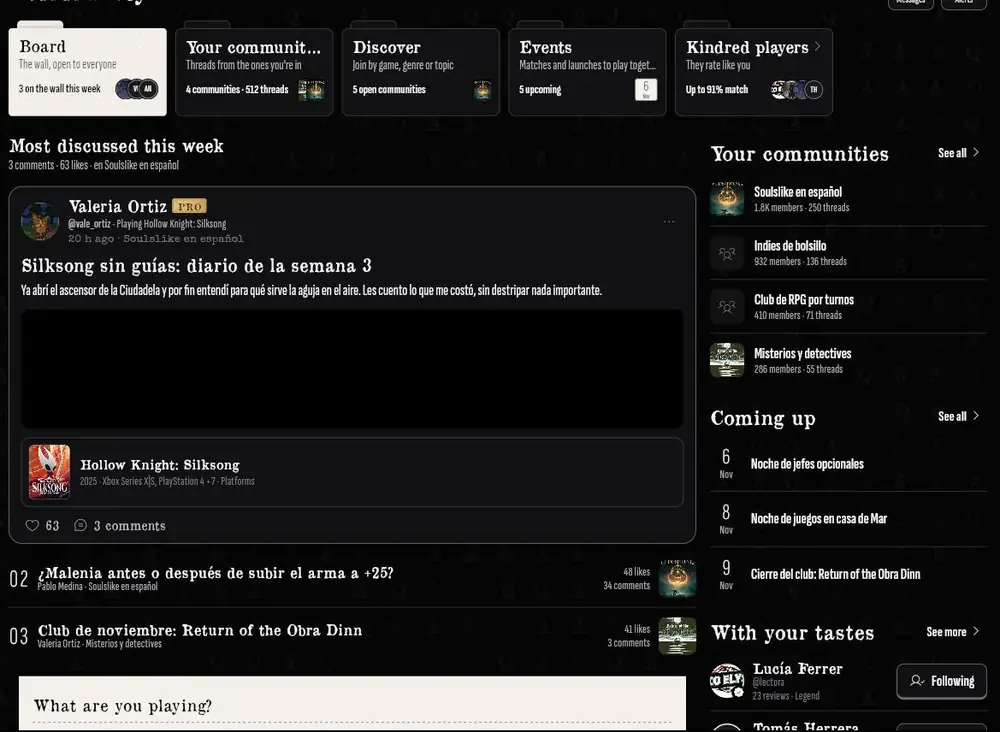
- Join communities
- Six sections: a board with the most commented posts, own communities, discover, events, projects and kindred players.
- Post in communities
- Formats include polls, questions, challenges and clips.
- Send messages
- An inbox of direct and group chats, with tabs for archived chats and requests from restricted people.
- Start a club
- Each club picks a game of the week and has its ranking.
- Check notifications
- Notifications are grouped by day and each leads to what caused it; another tab gathers the congratulations received.
- Find like-minded players
- Shows people who rate similarly on the same games, with their affinity, the games in common and where they differ.
- Compete in prediction pools
- Seasons run per community.
- Follow the club of the month by chapter
- Each chapter or hour range has its own thread, closed until it is reached, and spoilers open on tap.
- Run community tournaments
- Moderators set the slots, the draw and the results.
- Customize a community Pro+
- Paper, ink and stamp require Pro+.
- Link outside groups
- Works with Discord, WhatsApp, Telegram and Reddit.
- Share a QR code
- Scanning it with a camera opens the profile or the invitation.
- Share on WhatsApp, X or Discord
- It can also go as a Qritico message or as an image for stories.
- Invite friends
- The friend gets a month of Pro after rating 3 games. The inviter gets one when the friend has been active for a week.
- Block and report
- The menu on profiles, posts, messages and lists offers Report and Block; the blocked list allows unblocking.
- Vote on what gets built next
- Shows the ideas the team could build next; votes go only to ideas under voting, up to 3 at once with Pro+.
- Post to Discord Pro
- The channel gets a message when a game is finished.
- Add the Qritico bot to Discord Pro+
- /gameinfo looks up a game and /add saves it to the library.
- Read recent comments
- Community lists the newest comments on posts and reviews, with who wrote them, when and about what.
- See the group tier list
- It is generated from the members' public tier lists.
- Create game tournaments
- Games are voted on by rounds in brackets of 8, 16 or 32.
- Limits: Free 3 · Pro 20 · Pro+ 20
- Join a community by QR
- Each public community has a QR code that is scanned with the phone camera and leads to joining it.
- Compete with friends
- Standings cover the game of the day, prediction pools and the club table.
- Connect Discord roles
- A server gives roles for Pro, level, reviews and finished games.
- Sign in with Steam
- A Steam account works for signing in.
Buy and support
Features for finding deals, choosing a plan and supporting Qritico.
15 features
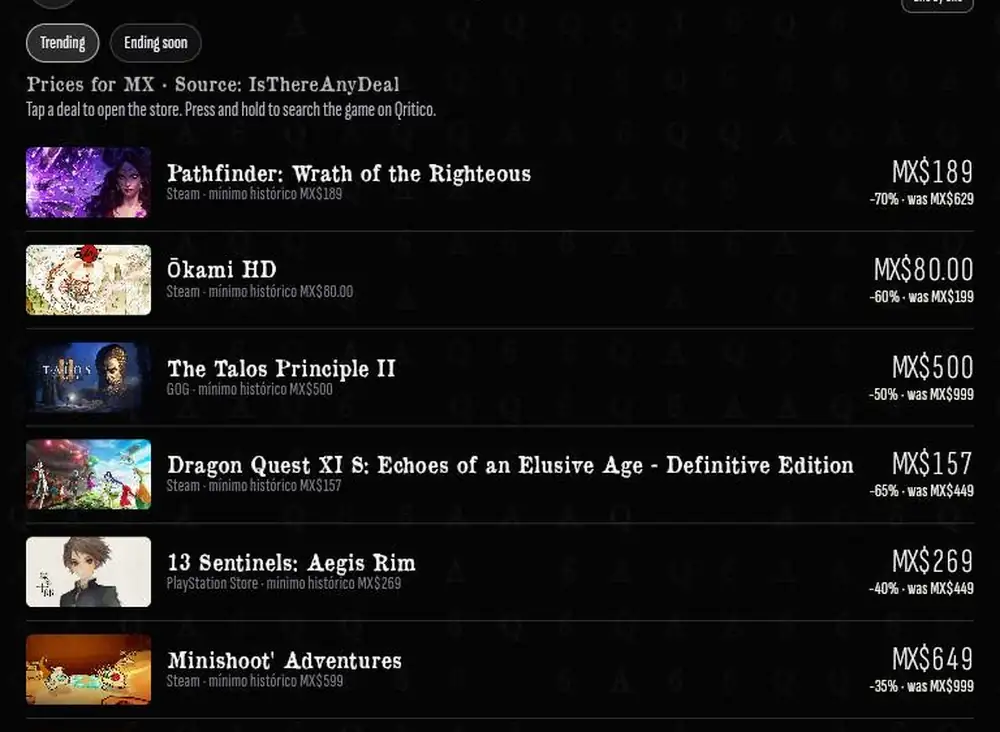
- See deals
- Lists current deals with price, discount and all-time low, plus another view with the ones ending soon.
- Get price alerts
- The alert arrives when the game drops to the chosen price.
- Limits: Free 5 · Pro 300 · Pro+ 300
- Decide whether to buy or wait
- The game page compares the historical low, the community’s fair price and the cost per hour.
- Claim free games
- Shows the PC games that stores are giving away right now, with their end date and a link to claim them.
- Subscribe to Pro Pro
- The price drops with time subscribed.
- Subscribe to Pro+ Pro+
- The plan includes everything in Pro and higher limits.
- Gift Pro One-time purchase
- There are passes for 1, 3 and 12 months, and each one comes with a code to share.
- Identify commission links
- When a store pays a commission, the link says so.
- Support as a patron Patrons
- The annual subscription includes Pro+, a badge and a place in the Credits.
- Buy lifetime Pro One-time purchase
- It is paid once. Only 500 are available.
- Redeem a code
- A pass code activates Pro.
- Leave a tip One-time purchase
- The tip supports Qritico and the name can appear in the Credits.
- Buy from the Qritico store
- Sells lifetime Pro, gift passes and tips.
- See how Qritico is funded
- Explains what the app lives on, with its real prices, and lists what is never sold.
- Pay by card on the web Pro
- The charge is in pesos.
Create and publish
Features for content creators and game studios.
34 features
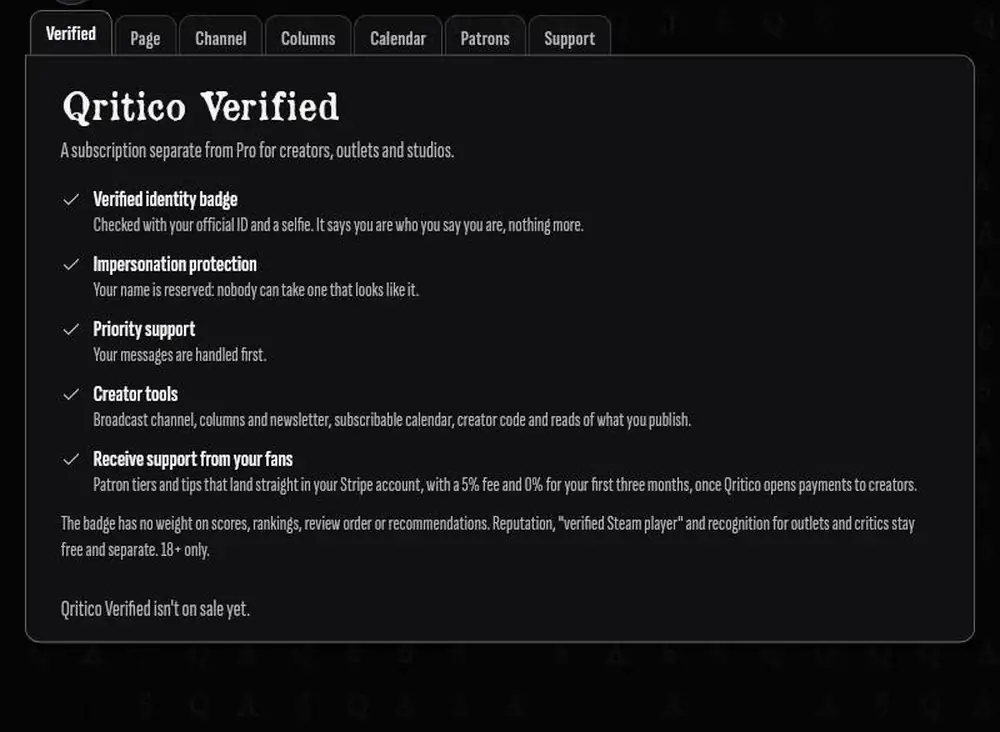
- Create a creator page Verified
- Works as a link for a social media bio.
- Gather a critic’s reviews Verified
- Media reviews stay in one profile.
- Write columns and newsletters Verified
- The texts arrive through the app and by email.
- See followed creators
- Shows who is supported with a membership, with renewal and seniority, and the followed channels with their notification type.
- Post to a broadcast channel Verified
- Used to send announcements and polls to followers.
- Verify identity Verified
- Verification opens the creator tools (18 and over only).
- Use the creator dashboard Verified
- Ten tabs gather verification, page, channel, columns, calendar, patrons, audience, live tools, support and store.
- Publish a creator calendar Verified
- Subscribes from Google or Apple.
- Follow studios and projects
- Lists verified studios with a search box and follower counts; each one is followed from its own page.
- Open closed tests
- A studio invites part of the community to try its game.
- Complete studio missions
- Each game has its ranking.
- Read opinion reports
- Only the studio team sees them.
- Publish a press kit
- The kit appears on the studio page and respects its embargoes.
- Propose game ideas
- Ideas get votes and can be remixed.
- Keep game keys
- These are the keys given by studios.
- Join idea challenges
- Challenges appear in the Idea workshop.
- Evaluate a studio’s concepts
- The studio uploads images or video and the community says whether it would play.
- Try demos at fairs
- Each fair gathers demos from several studios for a limited time.
- Apply for sponsorships
- Studios post offers for verified creators and media.
- See the media score
- It appears apart from the consensus.
- Open a patron club Verified
- It is a closed community for supporters on a tier that includes it.
- Link a merch store Verified
- The creator links their store from their page. The sale happens outside Qritico.
- Hand out creator codes Verified
- Each redeemed code supports the creator.
- Show overlays in OBS Verified
- Polls, tier lists and counters appear over the stream.
- Make predictions with the creator Verified
- Qritico points are used (they have no money value).
- Find like-minded creators
- Suggests creators with recent activity who rate similarly, with their match percentage and a follow button.
- Read a creator’s opinion
- A game’s page shows reviews by verified creators separately; they do not count toward the Qritico rating.
- Measure review impact Verified
- Shows how many people reached a game.
- Propose group challenges Verified
- Followers add progress each day until they reach the goal.
- Tip a creator
- The creator’s web page links to their tip services. The payment happens outside Qritico.
- Add store links to lists Verified
- Affiliate links are marked in the list.
- See creator analytics Verified
- In the creator studio, the Audience tab counts reads, visits and distinct people per day, and where they came from.
- Pay for wishlist campaigns
- A studio chooses its audience and pays for each add to the Qritico wishlist.
- Subscribe to Studio Pro Studio Pro
- Gives more capacity for keys, tests, panel history and campaigns.
Set up the account
Features for connecting services and adjusting the account.
18 features
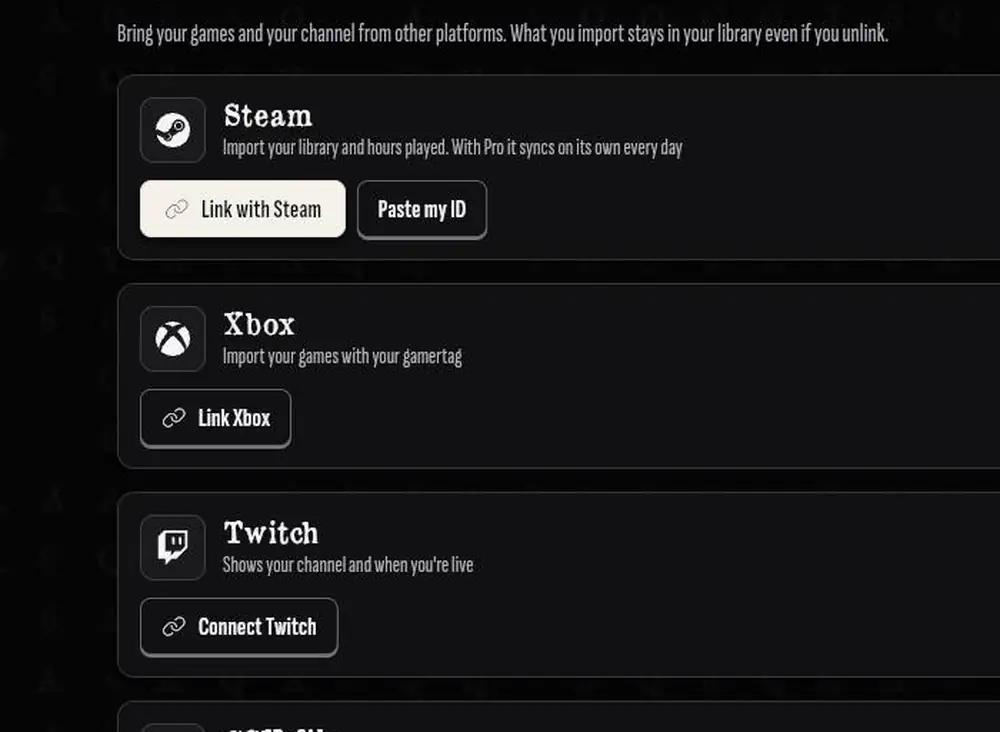
- Connect services
- Works with Steam, Xbox and Twitch.
- Use the web on a computer
- Has a sidebar, keyboard shortcuts and right-click.
- Install the Chrome extension
- Used to rate what is on screen on Twitch and YouTube.
- Adjust privacy
- Each person decides who sees their profile and activity.
- Download or delete data
- The download comes in JSON format.
- Change language and region
- The region sets the currency and the store.
- Change settings
- Settings are organized into account, appearance, notifications and privacy, and data and legal, with a search box by name.
- Adjust goals and notices
- The modes are Calm, Up to date and Competitive (with a vacation pause).
- See where the data comes from
- IGDB, Steam, Twitch, IsThereAnyDeal and the other sources, each with a link to its site.
- See Qritico outside the app
- Brings together the Discord bot, the OBS windows, the Chrome extension and the Steam, Xbox and Twitch accounts.
- Sync Steam every day Pro
- With Pro, the linked Steam library is imported again automatically every day.
- Use streamer mode
- Creates a window for OBS, the streaming program.
- Register services and devices
- Qritico uses them to open games.
- Register hardware
- It is compared with each game’s requirements.
- Choose notifications and times
- Each notification category is turned on or off separately, on the phone and by email, with quiet hours.
- Protect the account
- Includes two-step verification.
- Write to support
- Pro gets a priority response.
- Share public pages
- A list, a game or a tournament opens a page that search engines can find.
Questions about Qritico
What is Qritico?
Qritico is an app for rating video games, writing reviews, organizing your game library and discovering what to play. It works in the browser and has a free plan.
What can you do with Qritico?
Rate games from 1 to 10, write reviews, save your library and backlog, build lists and tier lists, discover new games, see your progress for the year and take part in the community.
Which languages is Qritico available in?
Qritico is available in 14 languages: Español, English, Português (Brasil), Français, Deutsch, Italiano, 日本語, 한국어, 简体中文, Русский, Bahasa Indonesia, Türkçe, العربية, हिन्दी.